Cartoon dumbbell radius
Overview
Only relavent when fancy helices is turned on, see Cartoon_Helix_Settings
set cartoon_dumbbell_radius defines the radius of the dumbbell ends when the fancy helices setting has been engaged
Setting to 0.1 eliminates the dumbbell shape with other settings to defaults, whereas setting <0.1 reveals interior space of the fancy helix
Syntax
set cartoon_dumbbell_radius, <number> #default setting is 0.15
Adjust this value or that of cartoon_dumbbell_width to remove the bulge at the edges of a fancy helix
Example
-
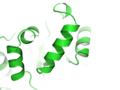 cartoon_dumbbell_radius 0
 -
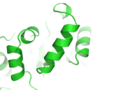 cartoon_dumbbell_radius 0.1
 -
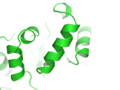 cartoon_dumbbell_radius 0.15 (default)
 -
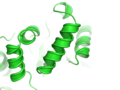 cartoon_dumbbell_radius 0.4


