Cartoon Helix Settings
Overview
This setting sets the style in which cartoon helices are rendered. The default is a helix with an ellipsoid cross section. Fancy mode helices are ribbons with tubular edges à la MolScript. Cylindicial mode renders helices as solid cylinders.
Syntax
To turn on Fancy Helices:
set cartoon_fancy_helices, 1
To turn on Cylindrical Helices:
set cartoon_cylindrical_helices, 1
To return to default helices:
set cartoon_fancy_helices, 0
set cartoon_cylindrical_helices, 0
Result
-
 Fancy helix
 -
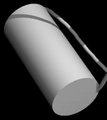 Cylindrical helix
 -
 Default representation


Change size of default cartoon helix
To change the size of the cartoon helices when not in the fancy helix mode you change the dimensions of the oval that represents the cross section of the default cartoon representation.

set cartoon_oval_length , 0.8 # default is 1.20
and
set cartoon_oval_width , 0.2 # default is 0.25
See also
Cartoon_oval_width, Cartoon_oval_length, Cartoon_oval_quality, Cartoon_helix_radius, Cartoon_dumbbell_radius, Cartoon_dumbbell_length, Cartoon_dumbbell_width, Cartoon_sampling.