Ray opaque background
Overview
This setting changes how PyMol treats the background. If this option is ON then the background is whatever you specify -- like black or white; however, if the setting is OFF, then the background will be treated as a transparent alpha channel.
Settings
Note: turning this setting off creates the transparent backgrounds.
# turn on transparent alpha channel
set ray_opaque_background, off
Examples
-
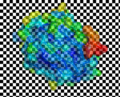 ray_opaque_background set to 0. The image from PyMOL is shown over a checkerboard.
 -
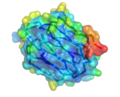 ray_opaque_background set to 1. The image from PyMOL is shown over a checkerboard, however because the background is opaque, the checkerboard underneath does not show through.

