Orthoscopic: Difference between revisions
| Line 1: | Line 1: | ||
== Overview == | == Overview == | ||
'''orthoscopic''' turns on and off the perspective handling. Turning '''on''' orthoscopic rendering removes the effects of perspective. | '''orthoscopic''' turns on and off the perspective handling. Turning '''on''' orthoscopic rendering removes the effects of perspective. To turn on perspective rendering see, the [[Field_Of_View|Field of View]] command. | ||
=== Performance Notes === | === Performance Notes === | ||
Revision as of 06:39, 24 February 2007
Overview
orthoscopic turns on and off the perspective handling. Turning on orthoscopic rendering removes the effects of perspective. To turn on perspective rendering see, the Field of View command.
Performance Notes
Turning on orthoscopic rendering improves the rendering speed by a factor of 2x-4x! So, if you have large images, or are rendering a movie that does not need perspective in the images, try turning off perspective by setting the orthoscopic flag to 1.
Examples
-
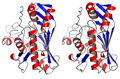 orthoscopic on/off (perspective OFF/ON)
 -
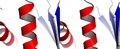 The perspective effect is magnified at greater zoom levels


Syntax
set orthoscopic, on
set orthoscopic, off