Mesh quality: Difference between revisions
Created new settings page for mesh_quality |
|||
| Line 1: | Line 1: | ||
== Overview == | == Overview == | ||
Altering the '''mesh_quality''' setting adjusts how precisely the mesh represents the surface. The higher the value the more curved and precise the surface is defined. The default is good compromise for quality and speed (mesh calculation time). | |||
The higher the value the more curved and precise the surface is defined. The default is good compromise for quality and | |||
== Syntax == | == Syntax == | ||
Revision as of 19:05, 8 March 2007
Overview
Altering the mesh_quality setting adjusts how precisely the mesh represents the surface. The higher the value the more curved and precise the surface is defined. The default is good compromise for quality and speed (mesh calculation time).
Syntax
set mesh_quality, <integer> #default 2
Example
-
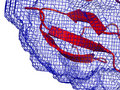 mesh_quality 0 (not smooth)
 -
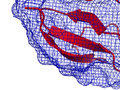 mesh_quality 1
 -
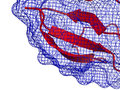 mesh_quality 2 (default)


