|
|
| (20 intermediate revisions by one other user not shown) |
| Line 1: |
Line 1: |
| == Author == | | {{Infobox script-repo |
| This pymol script is made by Troels Emtekær Linnet
| | |type = script |
| | |filename = scripts/rotkit.py |
| | |author = [[User:Tlinnet|Troels E. Linnet]] |
| | |license = BSD |
| | }} |
|
| |
|
| == Introduction == | | == Introduction == |
| This script-kit is a collection of small script to be able to precisely to put a molecule (like a dye) where you want in relation to a protein. | | This script-kit is a collection of small script to be able to precisely to put a molecule (like a dye) where you want in relation to a protein. |
|
| |
|
| You can also create rotational states of a domain. | | You can also create rotational states of a domain or simulate a dye freedom. |
|
| |
|
| It simply makes the [[Object_Matrix | PyMOL TTT matrixes]], in a easy and user friendly way. The calls to the functions available in PyMOL, takes care of all the | | It simply makes the [[Object_Matrix | PyMOL TTT matrixes]], in a easy and user friendly way. The calls to the functions available in PyMOL, takes care of all the |
| Line 52: |
Line 56: |
|
| |
|
| == Example of use == | | == Example of use == |
| === Make a rotation of domain === | | === Example 1 - Make a rotation of domain === |
| <syntaxhighlight lang="python"> | | {{Template:PymolScriptRepoDownload|examples/rotkit_1.pml}} |
| reinitialize
| | <include src="https://raw.github.com/Pymol-Scripts/Pymol-script-repo/master/examples/rotkit_1.pml" highlight="python" /> |
| import rotkit
| |
|
| |
| fetch 1HP1, async=0
| |
| show_as cartoon, 1HP1
| |
| show_as sticks, 1HP1 and resn ATP
| |
|
| |
|
| ###################### Make rotation axis #################
| | === Example 2 - Simulate dye freedom === |
| pseudoatom axisA, vdw=1.0
| | {{Template:PymolScriptRepoDownload|examples/rotkit_2.pml}} |
| pseudoatom axisB, vdw=1.0
| | <include src="https://raw.github.com/Pymol-Scripts/Pymol-script-repo/master/examples/rotkit_2.pml" highlight="python" /> |
| rotkit.toline("/1HP1//A/477/C","/1HP1//A/423/CG1","axisA","axisA",20)
| |
| rotkit.toline("/1HP1//A/423/CG1","/1HP1//A/477/C","axisB","axisB",5)
| |
| show spheres, axisA or axisB
| |
| label axisA, "axisA"
| |
| label axisB, "axisB"
| |
| dist rotaxis, axisA, axisB
| |
| color green, rotaxis
| |
| set dash_width, 5
| |
| set dash_gap, 0
| |
| hide label, rotaxis
| |
|
| |
|
| ## Create rotate states of 1HP1
| | === Example 3 - Create distance distribution histogram === |
| create 1HP1_rot_1, 1HP1, 1, 1
| | {{Template:PymolScriptRepoDownload|examples/rotkit_3.pml}} |
| create 1HP1_rot, 1HP1_rot_1, 1, 1
| | <include src="https://raw.github.com/Pymol-Scripts/Pymol-script-repo/master/examples/rotkit_3.pml" highlight="python" /> |
| python
| |
| ang_incr = 1
| |
| anglerange = range(2,98,ang_incr)
| |
| nrstates = (98-1)/ang_incr
| |
| states = 1
| |
| for angle in anglerange:
| |
| states += 1
| |
| rot_1HP1 = "1HP1_rot_%s"%angle
| |
| cmd.create(rot_1HP1,"(1HP1 and resi 363-550) or (1HP1 and resn ATP)")
| |
| rotkit.rotateline("axisA","axisB",-(angle-1),rot_1HP1)
| |
| cmd.create("1HP1_rot",rot_1HP1,1,states)
| |
| cmd.create("1HP1_rot",rot_1HP1,1,2*nrstates-angle)
| |
| cmd.delete(rot_1HP1)
| |
| cmd.delete("1HP1_rot_1")
| |
| python end | |
| hide cartoon, (1HP1 and resi 363-550)
| |
| hide sticks, (1HP1 and resn ATP)
| |
| mplay
| |
| </syntaxhighlight>
| |
|
| |
|
| == A tutorial.pml file == | | === Example 4 - A tutorial file === |
| | To understand how the functions works, read through the tutorial. Hash/Unhash "##" each step at the time to see the effect. |
| | To be able to follow the tutorial, you need the dye molecule, which is loaded from the Pymol-script-repository. |
|
| |
|
| To understand how the script works, read through the tutorial. Hash/Unhash "##" each step at the time to see the effect.
| | {{Template:PymolScriptRepoDownload|examples/rotkit_4.pml}} |
| | | <include src="https://raw.github.com/Pymol-Scripts/Pymol-script-repo/master/examples/rotkit_4.pml" highlight="python" /> |
| Make a test dir: '''/home/tlinnet/test''' and make a '''tutorial.pml''' with the commands.
| |
| | |
| To be able to follow the tutorial, you need the dye molecule.
| |
| Right clicking the following link here -> Save as: Atto590.pdb in the directory with the tutorial.pml file
| |
| https://raw.github.com/Pymol-Scripts/Pymol-script-repo/master/files_for_examples/Atto590.pdb
| |
| | |
| <syntaxhighlight lang="python">
| |
| reinitialize
| |
| cd /home/tlinnet/test
| |
| import rotkit
| |
|
| |
| fetch 1HP1, async=0
| |
| load Atto590.pdb
| |
| # Make sure everything is loaded before we continue
| |
| cmd.refresh()
| |
| | |
| ### Get the names of the loaded objects
| |
| protname = cmd.get_names()[0]
| |
| molname = cmd.get_names()[1]
| |
| | |
| ### Make the names we are going to use
| |
| protselectCB="%s and resi 308 and name CB"%protname
| |
| protnameselectCB="K308CB"
| |
| protselectCA="%s and resi 308 and name CA"%protname
| |
| protnameselectCA="K308CA"
| |
| molselect13="%s and id 13"%molname
| |
| molnameselect13="dyeatom13"
| |
| molselect12="%s and id 12"%molname
| |
| molnameselect12="dyeatom12"
| |
|
| |
| ### Make some selections
| |
| cmd.select("%s"%protnameselectCB,"%s"%protselectCB)
| |
| cmd.select("%s"%protnameselectCA,"%s"%protselectCA)
| |
| cmd.select("%s"%molnameselect13,"%s"%molselect13)
| |
| cmd.label("%s"%molnameselect13,"13")
| |
| cmd.select("%s"%molnameselect12,"%s"%molselect12)
| |
| cmd.label("%s"%molnameselect12,"12")
| |
| | |
| ### Make nice representations
| |
| cmd.show_as("cartoon","%s"%protname)
| |
| cmd.show("sticks","byres %s"%protnameselectCB)
| |
|
| |
| ##### PART I: Use of functions #####
| |
| ### This view will take you to the first part
| |
| set_view (\
| |
| 0.377224118, 0.880101919, -0.288305759,\
| |
| 0.661396861, -0.473919988, -0.581338286,\
| |
| -0.648268998, 0.028612033, -0.760871351,\
| |
| 0.000000000, 0.000000000, -56.408561707,\
| |
| 19.480533600, 34.572898865, 6.978204727,\
| |
| 46.615653992, 66.201446533, -20.000001907 )
| |
|
| |
| #### Just unhash each part for itself, as you continue through
| |
| ### To print a objects TTT matrix in a readable format
| |
| rotkit.printMat(cmd.get_object_matrix(molname))
| |
|
| |
| ##### We want to move the dye to a desired location, and rotate it to a view we desire
| |
| ##### First get the vector bewteen the dyeatom and the protein atom
| |
| diffvector = rotkit.vector("%s"%molselect13,"%s"%protnameselectCB)
| |
| ##### Then move the dye
| |
| move = rotkit.transmat(diffvector)
| |
| ##### print the matrix for fun
| |
| rotkit.printMat(move)
| |
| ##### Move the dye
| |
| cmd.transform_selection("%s"%molname,move)
| |
| | |
| ##### Now we want to displace the dye in the CA-CB bond direction
| |
| ##### First find the vector/direction to displace it in. From A -> B
| |
| diffvector = rotkit.vector("%s"%protnameselectCA,"%s"%protnameselectCB)
| |
| ##### Make the vector so its lenth is equal 1
| |
| uvector = rotkit.unitvector(diffvector)[0]
| |
| ##### Make the move translation matrix, and we multiply the matrix with 3, so it moves 3 Angstrom
| |
| move = rotkit.transmat(uvector,3)
| |
| ##### Print the matrix
| |
| rotkit.printMat(move)
| |
| ##### Displace it in the CA-CB direction
| |
| cmd.transform_selection("%s"%molname,move)
| |
| | |
| ##### Now we want to rotate it a single time. We convert 40 degress to radians
| |
| ##### The input is the angle, the line to rotate around, and a point where the line goes through
| |
| CBxyz = rotkit.getxyz("%s"%protnameselectCB)[0]
| |
| rmat = rotkit.rotmat(rotkit.radangle(40),uvector,CBxyz)
| |
| rotkit.printMat(rmat)
| |
| ##### Copy paste this line into pymol to see it manually
| |
| cmd.transform_selection("%s"%molname,rmat)
| |
| | |
| ##### We are not quite satisfied, we want to rotate it around its own bond
| |
| ##### So we rotate in around its own 13 -> 12 bonds
| |
| diffvector = rotkit.vector("%s"%molnameselect13,"%s"%molnameselect12)
| |
| uvector = rotkit.unitvector(diffvector)[0]
| |
| xyz12 = rotkit.getxyz("%s"%molnameselect12)[0]
| |
| rmat = rotkit.rotmat(rotkit.radangle(10),uvector,xyz12)
| |
| ##### Copy paste this line into pymol to see it manually
| |
| cmd.transform_selection("%s"%molname,rmat)
| |
| | |
| ##### Now, lets make a function that collects all these call in one function
| |
| ##### We only want to define two positions that defines the line, the angle and the object to rotate
| |
| rotkit.rotateline("%s"%molnameselect13,"%s"%molnameselect12,180,"%s"%molname)
| |
| ##### This is made as a pymol command as well. I first print the names that we should write manually in the consol
| |
| print("rotateline Pos1=%s, Pos2=%s, degangle=15, molecule=%s"%(molnameselect13, molnameselect12, molname))
| |
| | |
| ##### To illustate best, we create som copies of the dye
| |
| python
| |
| anglerange = range(90,360,90)
| |
| for angle in anglerange:
| |
| ### Make a suitable name for the new molecule
| |
| molanglename="%s%s"%(molname,angle)
| |
| ### Now make a copy
| |
| cmd.create(molanglename,molname)
| |
| cmd.label("%s and id 12"%molanglename,"12")
| |
| cmd.label("%s and id 13"%molanglename,"13")
| |
| ### Rotate the copy
| |
| rotkit.rotateline("%s"%protnameselectCB,"%s"%molnameselect13,angle,"%s"%molanglename)
| |
| python end | |
| | |
| | |
| ####### End of PART I ####
| |
| ####### PART II: More advanced functions #####
| |
| ##### This view will take you to the second part
| |
| set_view (\
| |
| 0.723298192, 0.467510879, 0.508201897,\
| |
| 0.371686131, -0.883831143, 0.284063697,\
| |
| 0.581970334, -0.016570913, -0.813038886,\
| |
| 0.000000000, 0.000000000, -76.609786987,\
| |
| 11.790571213, 64.992294312, 20.803859711,\
| |
| -31.181428909, 184.401092529, -20.000001907 )
| |
| | |
| ##### We can fast mutate a protein. frame 1 is the most probable mutation
| |
| rotkit.mutate(protname, chain="A", resi=513, target="CYS", mutframe=1)
| |
| ##### The mutate functions take 0.2 seconds, so we put in a refesh command to wait for everything is done
| |
| cmd.refresh()
| |
| ##### This is made as a pymol command as well. I first print the names that we should write manually in the consol
| |
| print("mutate %s, chain=%s, resi=%s, target=CYS, mutframe=1"%(protname, "A", 515))
| |
| | |
| ##### We now make some selections for this mutation
| |
| protselectCBcys="%s and resi 513 and name CB"%protname
| |
| protnameselectCBcys="P513C_CB"
| |
| protselectCAcys="%s and resi 513 and name CA"%protname
| |
| protnameselectCAcys="P513C_CA"
| |
| cmd.select("%s"%protnameselectCBcys,"%s"%protselectCBcys)
| |
| cmd.select("%s"%protnameselectCAcys,"%s"%protselectCAcys)
| |
| | |
| ##### Now, lets make a function that collects all the commands to put on an atom on the same line defined by two points
| |
| ##### The input is the two points that define the line, the atom of a molecule to be put on the line, and the distance to move
| |
| rotkit.toline(protnameselectCAcys,protnameselectCBcys,molnameselect13,molname,3)
| |
| rotkit.rotateline(protnameselectCAcys,protnameselectCBcys,180,molname)
| |
| rotkit.rotateline(molnameselect13,molnameselect12,10,molname)
| |
| print("toline Pos1=%s, Pos2=%s, atom=%s, molecule=%s, dist=%s"%(protnameselectCAcys,protnameselectCBcys,molnameselect13,molname,3))
| |
| print("rotateline Pos1=%s, Pos2=%s, degangle=180, molecule=%s"%(protnameselectCAcys, protnameselectCBcys, molname))
| |
| print("rotateline Pos1=%s, Pos2=%s, degangle=10, molecule=%s"%(molnameselect13, molnameselect12, molname))
| |
| cmd.refresh()
| |
| ####### End of PART II ####
| |
| | |
| ####### Now we make a cross product ####
| |
| molselect14="%s and id 14"%molname
| |
| molnameselect14="dyeatom14"
| |
| cmd.select("%s"%molnameselect14,"%s"%molselect14)
| |
| cmd.label("%s"%molnameselect14,"14")
| |
| | |
| cross = rotkit.crossprod(rotkit.vector(molselect13,molselect12),rotkit.vector(molselect13,molselect14))
| |
| unity_cross = rotkit.unitvector(cross)[0]
| |
| point_cross = rotkit.crosspoint(molselect13,cross)
| |
| rotkit.rotateline(molnameselect13,point_cross,180,molname)
| |
| print("rotateline Pos1=%s, Pos2=%s, degangle=10, molecule=%s"%(molnameselect13, pcross, molname))
| |
| </syntaxhighlight>
| |
| | |
| == Python Code ==
| |
| This code has been put under version control. In the project, [http://www.pymolwiki.org/index.php/Git_intro Pymol-script-repo].
| |
| | |
| For a color coded view:
| |
| https://github.com/Pymol-Scripts/Pymol-script-repo/blob/master/rotkit.py
| |
| See the raw code or download manually, by right clicking the following link here -> Save as: rotkit.py
| |
| https://raw.github.com/Pymol-Scripts/Pymol-script-repo/master/rotkit.py
| |
|
| |
|
| [[Category:Script_Library]] | | [[Category:Script_Library]] |
| [[Category:ObjSel_Scripts]] | | [[Category:ObjSel_Scripts]] |
| | [[Category:Pymol-script-repo]] |
Introduction
This script-kit is a collection of small script to be able to precisely to put a molecule (like a dye) where you want in relation to a protein.
You can also create rotational states of a domain or simulate a dye freedom.
It simply makes the PyMOL TTT matrixes, in a easy and user friendly way. The calls to the functions available in PyMOL, takes care of all the
conversion of input and such.
If you are interested in this, you might also want to check out the PyMOL Chempy module that is included in PyMOL. It provides handy vector and matrix functions.
Functions available in PyMOL
- rotateline(Pos1,Pos2,degangle,molecule):
- "Pos1->Pos2" define a line whereabout "molecule" will be rotated "degangle" degrees
- rotateline Pos1=P513C_CA, Pos2=P513C_CB, degangle=5, molecule=Atto590
- rotateline Pos1=dyeatom87, Pos2=dyeatom85, degangle=10, molecule=Atto590
- mutate(molecule,chain,resi,target="CYS",mutframe="1"):
- Mutate a /molecule//chain/resi into a target, and selecting most probable frame 1
- mutate 1HP1, chain=A, resi=515, target=CYS, mutframe=1
- toline(Pos1,Pos2,atom,molecule,dist=1):
- Translate molecule atom, 1 angstrom away in the same direction Pos1->Pos2 specify
- toline Pos1=P513C_CA, Pos2=P513C_CB, atom=dyeatom87, molecule=Atto590, dist=3
Available through rotkit.functionname
- printMat(matrix):
- prints the TTT matrix in a readable format. (4X4)
- getxyz(Sel):
- output is a list [x,y,z] in float. The input can be a list, a string(list) or a selection.
- vector(Sel1,Sel2):
- Finds the vector between points. Gets the xyz list from getxyz, so input can be anything.
- vectorstr(vector):
- turn a vector in list format into string. No real function actually.
- transmat(vector,dist=1):
- Makes a TTT translation matrix for according to the input vector. The vector is multiplied with dist.
- unitvector(vector):
- Make a vector a unitvector.
- radangle(angle):
- Convert degree to radians. Not that all input are assumed to be in degrees, and are converted automatically.
- rotmat(angle,vectornorm,pointcoord):
- This function is the most important. That makes the TTT matrix that rotates a molecule around a normalized vector, which goes through a coordinate point.
- crossprod(Vector1, Vector2):
- Makes a crossproduct between two vectors
- crosspoint(Pos1, crossprod):
- Returns the endpoint for the Position plus the crossproduct vector. Suitable if one would like to rotate around a crossvector.
-
Place your dye how you want. You always get same ending position.
-
Mutate a residue through command line, and quickly put your dye there.
Example of use
Example 1 - Make a rotation of domain
<include src="https://raw.github.com/Pymol-Scripts/Pymol-script-repo/master/examples/rotkit_1.pml" highlight="python" />
Example 2 - Simulate dye freedom
<include src="https://raw.github.com/Pymol-Scripts/Pymol-script-repo/master/examples/rotkit_2.pml" highlight="python" />
Example 3 - Create distance distribution histogram
<include src="https://raw.github.com/Pymol-Scripts/Pymol-script-repo/master/examples/rotkit_3.pml" highlight="python" />
Example 4 - A tutorial file
To understand how the functions works, read through the tutorial. Hash/Unhash "##" each step at the time to see the effect.
To be able to follow the tutorial, you need the dye molecule, which is loaded from the Pymol-script-repository.
<include src="https://raw.github.com/Pymol-Scripts/Pymol-script-repo/master/examples/rotkit_4.pml" highlight="python" />
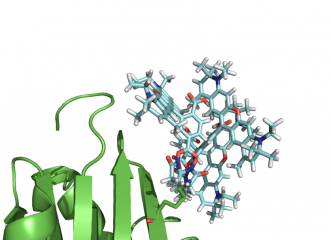 Place your dye how you want. You always get same ending position.
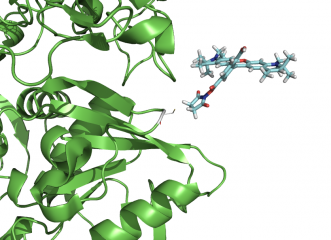 Mutate a residue through command line, and quickly put your dye there.
