|
|
| (12 intermediate revisions by 4 users not shown) |
| Line 1: |
Line 1: |
| ===DESCRIPTION=== | | {{Infobox script-repo |
| | |type = plugin |
| | |filename = plugins/dynoplot.py |
| | |author = [[User:Tmwsiy|Dan Kulp]] |
| | |license = - |
| | }} |
| | == Introduction == |
| This script was setup to do generic plotting, that is given a set of data and axis labels it would create a plot. Initially, I had it setup to draw the plot directly in the PyMol window (allowing for both 2D and 3D style plots), but because I couldn't figure out how to billboard CGO objects (Warren told me at the time that it couldn't be done) I took a different approach. The plot now exists in it's own window and can only do 2D plots. It is however interactive. I only have here a Rama.(phi,psi) plot, but the code can be easily extended to other types of data. For instance, I had this working for an energy vs distance data that I had generated by another script. | | This script was setup to do generic plotting, that is given a set of data and axis labels it would create a plot. Initially, I had it setup to draw the plot directly in the PyMol window (allowing for both 2D and 3D style plots), but because I couldn't figure out how to billboard CGO objects (Warren told me at the time that it couldn't be done) I took a different approach. The plot now exists in it's own window and can only do 2D plots. It is however interactive. I only have here a Rama.(phi,psi) plot, but the code can be easily extended to other types of data. For instance, I had this working for an energy vs distance data that I had generated by another script. |
|
| |
|
| Line 11: |
Line 17: |
|
| |
|
| ===SETUP=== | | ===SETUP=== |
| place the DynoPlot.py script into the appropriate startup directory then restart PyMol
| | Install from the plugins menu with ''Plugin > Manage Plugins > Install ...'' or just [[run]] the script. |
| | |
| ==== LINUX old-style installation ====
| |
| | |
| $PYMOL_PATH/modules/pmg_tk/startup/
| |
| | |
| ==== LINUX distutils installation ====
| |
| | |
| /usr/lib/pythonX.X/site-packages/pmg_tk/startup/
| |
| | |
| ==== Windows ====
| |
| | |
| PYMOL_PATH/modules/pmg_tk/startup/ , where PYMOL_PATH on Windows is defaulted to C:/Program Files/DeLano Scientific/PyMol/start/
| |
|
| |
|
| ===NOTES / STATUS=== | | ===NOTES / STATUS=== |
| *Tested on Windows, PyMol version 0.97 | | *Tested on Linux, PyMol version 1.4 |
| *This is an initial version, which needs some work.
| |
| *Left, Right mouse buttons do different things; Right = identify data point, Left = drag data point around | | *Left, Right mouse buttons do different things; Right = identify data point, Left = drag data point around |
| *Post comments/questions or send them to: dwkulp@mail.med.upenn.edu | | *Post comments/questions or send them to: dwkulp@mail.med.upenn.edu |
|
| |
|
| ===USAGE=== | | ===USAGE=== |
| rama SELECTION | | |
| | rama [ sel [, name [, symbols [, filename ]]]] |
|
| |
|
| ===EXAMPLES=== | | ===EXAMPLES=== |
| *load pdb file 1ENV (download it or use the PDB loader plugin)
| |
| *select resi 129-136
| |
| *rama sel01
| |
| *rock # the object needs to be moving in order for the angles to be updated.
| |
|
| |
|
| ===REFERENCES===
| | <source lang="python"> |
| | | fetch 1ENV, async=0 # (download it or use the PDB loader plugin) |
| ===SCRIPTS (DynoPlot.py)===
| | select sel01, resi 129-136 |
| DynoPlot.py
| | rama sel01 |
| <source lang="python">
| | rock # the object needs to be moving in order for the angles to be updated. |
| #!/usr/bin/env python
| | </source> |
| ###############################################
| |
| # File: DynoPlot.py
| |
| # Author: Dan Kulp
| |
| # Creation Date: 8/29/05
| |
| #
| |
| # Notes:
| |
| # Draw plots that display interactive data.
| |
| # Phi,Psi plot shown.
| |
| ###############################################
| |
| | |
| | |
| from __future__ import division
| |
| from __future__ import generators
| |
| | |
| import os,math
| |
| import Tkinter
| |
| from Tkinter import *
| |
| import Pmw
| |
| import distutils.spawn # used for find_executable
| |
| import random
| |
| from pymol import cmd
| |
| | |
| try:
| |
| import pymol
| |
| REAL_PYMOL = True
| |
| except ImportError:
| |
| print "Nope"
| |
| | |
| canvas = None
| |
| init = 0
| |
| | |
| class SimplePlot(Tkinter.Canvas):
| |
| | |
| # Class variables
| |
| mark = 'Oval' # Only 'Oval' for now..
| |
| mark_size = 5
| |
| xlabels = [] # axis labels
| |
| ylabels = []
| |
| spacingx = 0 # spacing in x direction
| |
| spacingy = 0
| |
| xmin = 0 # min value from each axis
| |
| ymin = 0
| |
| lastx = 0 # previous x,y pos of mouse
| |
| lasty = 0
| |
| down = 0 # flag for mouse pressed
| |
| item = (0,) # items array used for clickable events
| |
| shapes = {} # store plot data, x,y etc..
| |
| | |
| def axis(self,xmin=40,xmax=300,ymin=10,ymax=290,xint=290,yint=40,xlabels=[],ylabels=[]):
| |
| | |
| # Store variables in self object
| |
| self.xlabels = xlabels
| |
| self.ylabels = ylabels
| |
| self.spacingx = (xmax-xmin) / (len(xlabels) - 1)
| |
| self.spacingy = (ymax-ymin) / (len(ylabels) - 1)
| |
| self.xmin = xmin
| |
| self.ymin = ymin
| |
| | |
| # Create axis lines
| |
| self.create_line((xmin,xint,xmax,xint),fill="black",width=3)
| |
| self.create_line((yint,ymin,yint,ymax),fill="black",width=3)
| |
| | |
| # Create tick marks and labels
| |
| nextspot = xmin
| |
| for label in xlabels:
| |
| self.create_line((nextspot, xint+5,nextspot, xint-5),fill="black",width=2)
| |
| self.create_text(nextspot, xint-15, text=label)
| |
| if len(xlabels) == 1:
| |
| nextspot = xmax
| |
| else:
| |
| nextspot += (xmax - xmin)/ (len(xlabels) - 1)
| |
| | |
| | |
| nextspot = ymax
| |
| for label in ylabels:
| |
| self.create_line((yint+5,nextspot,yint-5,nextspot),fill="black",width=2)
| |
| self.create_text(yint-20,nextspot,text=label)
| |
| if len(ylabels) == 1:
| |
| nextspot = ymin
| |
| else:
| |
| nextspot -= (ymax - ymin)/ (len(ylabels) - 1)
| |
| | |
| | |
| # Plot a point
| |
| def plot(self,xp,yp,meta):
| |
|
| |
| # Convert from 'label' space to 'pixel' space
| |
| x = self.convertToPixel("X",xp)
| |
| y = self.convertToPixel("Y",yp)
| |
| | |
| if self.mark == "Oval":
| |
| oval = self.create_oval(x-self.mark_size,y-self.mark_size,x+self.mark_size,y+self.mark_size,width=1,outline="black",fill="SkyBlue2")
| |
| | |
| self.shapes[oval] = [x,y,0,xp,yp,meta]
| |
| | |
| | |
| # Repaint all points
| |
| def repaint(self):
| |
| for value in self.shapes.values():
| |
| x = value[0]
| |
| y = value[1]
| |
| self.create_oval(x-self.mark_size,y-self.mark_size,x+self.mark_size,y+self.mark_size,width=1,outline="black",fill="SkyBlue2")
| |
| | |
| # Convert from pixel space to label space
| |
| def convertToLabel(self,axis, value):
| |
| | |
| # Defaultly use X-axis info
| |
| label0 = self.xlabels[0]
| |
| label1 = self.xlabels[1]
| |
| spacing = self.spacingx
| |
| min = self.xmin
| |
| | |
| # Set info for Y-axis use
| |
| if axis == "Y":
| |
| label0 = self.ylabels[0]
| |
| label1 = self.ylabels[1]
| |
| spacing = self.spacingy
| |
| min = self.ymin
| |
| | |
| pixel = value - min
| |
| label = pixel / spacing
| |
| label = label0 + label * abs(label1 - label0)
| |
| | |
| if axis == "Y":
| |
| label = - label
| |
| | |
| return label
| |
| | |
| # Converts value from 'label' space to 'pixel' space
| |
| def convertToPixel(self,axis, value):
| |
| | |
| # Defaultly use X-axis info
| |
| label0 = self.xlabels[0]
| |
| label1 = self.xlabels[1]
| |
| spacing = self.spacingx
| |
| min = self.xmin
| |
| | |
| # Set info for Y-axis use
| |
| if axis == "Y":
| |
| label0 = self.ylabels[0]
| |
| label1 = self.ylabels[1]
| |
| spacing = self.spacingy
| |
| min = self.ymin
| |
|
| |
|
| | Don't create callback object, use symbols by secondary structure and dump canvas as postscript file: |
|
| |
|
| # Get axis increment in 'label' space
| | <source lang="python"> |
| inc = abs(label1 - label0)
| | fetch 2x19, async=0 |
| | | color yellow, chain A |
| # 'Label' difference from value and smallest label (label0)
| | color forest, chain B |
| diff = float(value - label0)
| | rama polymer, none, ss, /tmp/canvasdump.ps |
|
| | rama ss H, none, aa, /tmp/canvasdump_helix.ps |
| # Get whole number in 'label' space
| | rama ss S, none, aa, /tmp/canvasdump_sheet.ps |
| whole = int(diff / inc)
| |
| | |
| # Get fraction number in 'label' space
| |
| part = float(float(diff/inc) - whole)
| |
| | |
| # Return 'pixel' position value
| |
| pixel = whole * spacing + part * spacing
| |
| | |
| # print "Pixel: %f * %f + %f * %f = %f" % (whole, spacing, part, spacing,pixel)
| |
| | |
| # Reverse number by subtracting total number of pixels - value pixels
| |
| if axis == "Y":
| |
| tot_label_diff = float(self.ylabels[len(self.ylabels)- 1] - label0)
| |
| tot_label_whole = int(tot_label_diff / inc)
| |
| tot_label_part = float(float(tot_label_diff / inc) - tot_label_whole)
| |
| tot_label_pix = tot_label_whole * spacing + tot_label_part *spacing
| |
| | |
| pixel = tot_label_pix - pixel
| |
| | |
| # Add min edge pixels
| |
| pixel = pixel + min
| |
|
| |
| return pixel
| |
| | |
|
| |
| # Print out which data point you just clicked on..
| |
| def pickWhich(self,event):
| |
|
| |
| # Find closest data point
| |
| x = event.widget.canvasx(event.x)
| |
| y = event.widget.canvasx(event.y)
| |
| spot = event.widget.find_closest(x,y)
| |
| | |
| # Print the shape's meta information corresponding with the shape that was picked
| |
| if spot[0] in self.shapes:
| |
| print "Residue(Ca): %s\n" % self.shapes[spot[0]][5][2]
| |
| | |
| | |
| # Mouse Down Event
| |
| def down(self,event):
| |
| | |
| # Store x,y position
| |
| self.lastx = event.x
| |
| self.lasty = event.y
| |
| | |
| # Find the currently selected item
| |
| x = event.widget.canvasx(event.x)
| |
| y = event.widget.canvasx(event.y)
| |
| self.item = event.widget.find_closest(x,y)
| |
|
| |
| # Identify that the mouse is down
| |
| self.down = 1
| |
| | |
| # Mouse Up Event
| |
| def up(self,event):
| |
| | |
| # Get label space version of x,y
| |
| labelx = self.convertToLabel("X",event.x)
| |
| labely = self.convertToLabel("Y",event.y)
| |
| | |
| # Convert new position into label space..
| |
| if self.item[0] in self.shapes:
| |
| self.shapes[self.item[0]][0] = event.x
| |
| self.shapes[self.item[0]][1] = event.y
| |
| self.shapes[self.item[0]][2] = 1
| |
| self.shapes[self.item[0]][3] = labelx
| |
| self.shapes[self.item[0]][4] = labely
| |
| | |
| # Reset Flags
| |
| self.item = (0,)
| |
| self.down = 0
| |
| | |
| | |
| # Mouse Drag(Move) Event
| |
| def drag(self,event):
| |
|
| |
| # Check that mouse is down and item clicked is a valid data point
| |
| if self.down and self.item[0] in self.shapes:
| |
|
| |
| self.move(self.item, event.x - self.lastx, event.y - self.lasty)
| |
| | |
| self.lastx = event.x
| |
| self.lasty = event.y
| |
| | |
| | |
| def __init__(self):
| |
| | |
| self.menuBar.addcascademenu('Plugin', 'PlotTools', 'Plot Tools',
| |
| label='Plot Tools')
| |
| self.menuBar.addmenuitem('PlotTools', 'command',
| |
| 'Launch Rama Plot',
| |
| label='Rama Plot',
| |
| command = lambda s=self: ramaplot())
| |
| | |
| | |
| def ramaplot(x=0,y=0,meta=[],clear=0):
| |
| global canvas
| |
| global init
| |
| | |
| # If no window is open
| |
| if init == 0:
| |
| rootframe=Tk()
| |
| rootframe.title(' Dynamic Angle Plotting ')
| |
| | |
| canvas = SimplePlot(rootframe,width=320,height=320)
| |
| canvas.bind("<Button-2>",canvas.pickWhich)
| |
| canvas.bind("<Button-3>",canvas.pickWhich)
| |
| canvas.bind("<ButtonPress-1>",canvas.down)
| |
| canvas.bind("<ButtonRelease-1>",canvas.up)
| |
| canvas.bind("<Motion>",canvas.drag)
| |
| canvas.pack(side=Tkinter.LEFT,fill="both",expand=1)
| |
| canvas.axis(xint=150,xlabels=[-180,-150,-120,-90,-60,-30,0,30,60,90,120,150,180],ylabels=[-180,-150,-120,-90,-60,-30,0,30,60,90,120,150,180])
| |
| canvas.update()
| |
| init = 1
| |
| else:
| |
| canvas.plot(int(x), int(y),meta)
| |
| | |
| | |
| # New Callback object, so that we can update the structure when phi,psi points are moved.
| |
| class DynoRamaObject:
| |
| global canvas
| |
| | |
| def start(self,sel):
| |
| | |
| # Get selection model
| |
| model = cmd.get_model(sel)
| |
| residues = ['dummy']
| |
| resnames = ['dummy']
| |
| phi = []
| |
| psi = []
| |
| dummy = []
| |
| i = 0
| |
| | |
| # Loop through each atom
| |
| for at in model.atom:
| |
| | |
| # Only plot once per residue
| |
| if at.chain+":"+at.resn+":"+at.resi not in residues:
| |
| residues.append(at.chain+":"+at.resn+":"+at.resi)
| |
| resnames.append(at.resn+at.resi)
| |
| dummy.append(i)
| |
| i += 1
| |
| | |
| # Check for a null chain id (some PDBs contain this)
| |
| unit_select = ""
| |
| if at.chain != "":
| |
| unit_select = "chain "+str(at.chain)+" and "
| |
| | |
| # Define selections for residue i-1, i and i+1
| |
| residue_def = unit_select+'resi '+str(at.resi)
| |
| residue_def_prev = unit_select+'resi '+str(int(at.resi)-1)
| |
| residue_def_next = unit_select+'resi '+str(int(at.resi)+1)
| |
| | |
| try:
| |
| # Store phi,psi residue definitions to pass on to plot routine
| |
| phi_psi = [
| |
| # Phi angles
| |
| residue_def_prev+' and name C',
| |
| residue_def+' and name N',
| |
| residue_def+' and name CA',
| |
| residue_def+' and name C',
| |
| # Psi angles
| |
| residue_def+' and name N',
| |
| residue_def+' and name CA',
| |
| residue_def+' and name C',
| |
| residue_def_next+' and name N']
| |
| | |
| # Compute phi/psi angle
| |
| phi = cmd.get_dihedral(phi_psi[0],phi_psi[1],phi_psi[2],phi_psi[3])
| |
| psi = cmd.get_dihedral(phi_psi[4],phi_psi[5],phi_psi[6],phi_psi[7])
| |
|
| |
| print "Plotting Phi,Psi: "+str(phi)+","+str(psi)
| |
| ramaplot(phi,psi,meta=phi_psi)
| |
| except:
| |
| continue
| |
| | |
| | |
| def __call__(self):
| |
| | |
| # Loop through each item on plot to see if updated
| |
| for key,value in canvas.shapes.items():
| |
| dihedrals = value[5]
| |
| | |
| # Look for update flag...
| |
| if value[2]:
| |
| | |
| # Set residue's phi,psi to new values
| |
| print "Re-setting Phi,Psi: %s,%s" % (value[3],value[4])
| |
| cmd.set_dihedral(dihedrals[0],dihedrals[1],dihedrals[2],dihedrals[3],value[3])
| |
| cmd.set_dihedral(dihedrals[4],dihedrals[5],dihedrals[6],dihedrals[7],value[4])
| |
| | |
| value[2] = 0
| |
| | |
|
| |
|
| |
| # The wrapper function, used to create the Ploting window and the PyMol callback object
| |
| def rama(sel):
| |
| rama = DynoRamaObject()
| |
| rama.start(sel)
| |
| cmd.load_callback(rama, "DynoRamaObject")
| |
| cmd.zoom("all")
| |
| | |
| | |
| # Extend these commands
| |
| cmd.extend('rama',rama)
| |
| cmd.extend('ramaplot',ramaplot)
| |
| | |
| </source> | | </source> |
|
| |
| ===ADDITIONAL RESOURCES===
| |
|
| |
|
| |
|
| |
|
| [[Category:Script_Library|DynoPlot]] | | [[Category:Script_Library|DynoPlot]] |
| [[Category:Structural_Biology_Scripts|DynoPlot]] | | [[Category:Structural_Biology_Scripts|DynoPlot]] |
| | [[Category:Pymol-script-repo]] |
Introduction
This script was setup to do generic plotting, that is given a set of data and axis labels it would create a plot. Initially, I had it setup to draw the plot directly in the PyMol window (allowing for both 2D and 3D style plots), but because I couldn't figure out how to billboard CGO objects (Warren told me at the time that it couldn't be done) I took a different approach. The plot now exists in it's own window and can only do 2D plots. It is however interactive. I only have here a Rama.(phi,psi) plot, but the code can be easily extended to other types of data. For instance, I had this working for an energy vs distance data that I had generated by another script.
This script will create a Phi vs Psi(Ramachandran) plot of the selection given. The plot will display data points which can be dragged around Phi,Psi space with the corresponding residue's Phi,Psi angles changing in the structure (PyMol window).
IMAGES
SETUP
Install from the plugins menu with Plugin > Manage Plugins > Install ... or just run the script.
NOTES / STATUS
- Tested on Linux, PyMol version 1.4
- Left, Right mouse buttons do different things; Right = identify data point, Left = drag data point around
- Post comments/questions or send them to: dwkulp@mail.med.upenn.edu
USAGE
rama [ sel [, name [, symbols [, filename ]]]]
EXAMPLES
fetch 1ENV, async=0 # (download it or use the PDB loader plugin)
select sel01, resi 129-136
rama sel01
rock   # the object needs to be moving in order for the angles to be updated.
Don't create callback object, use symbols by secondary structure and dump canvas as postscript file:
fetch 2x19, async=0
color yellow, chain A
color forest, chain B
rama polymer, none, ss, /tmp/canvasdump.ps
rama ss H,    none, aa, /tmp/canvasdump_helix.ps
rama ss S,    none, aa, /tmp/canvasdump_sheet.ps
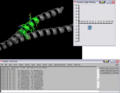 Initial Ramachandran plot of 1ENV
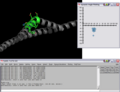 Modified pose and plot of 1ENV
