|
|
| (18 intermediate revisions by 3 users not shown) |
| Line 1: |
Line 1: |
| | {{Infobox script-repo |
| | |type = Python Module |
| | |filename = scripts/colorbyrmsd.py |
| | |author = [[User:Shiven|Shivender Shandilya]], [[User:Inchoate|Jason Vertrees]], [[User:Speleo3|Thomas Holder]] |
| | |license = BSD-2-Clause |
| | }} |
| | |
| == Introduction == | | == Introduction == |
| | This script allows you to color two structures by Root Mean Square Deviation (RMSD). |
| | The distances between aligned C-alpha atom pairs are stored as B-factors of these residues, which are colored by a color spectrum, with blue specifying the minimum pairwise RMSD and red indicating the maximum. |
| | Unaligned residues are colored gray. |
|
| |
|
| An attempt to perform a coloring of two structures by RMS deviation as calculated by PyMol's internal [[Rms_Cur]] command.
| | == Usage == |
|
| |
|
| == Code ==
| | colorbyrmsd mobile, target [, doAlign [, doPretty [, guide [, method ]]]] |
| === Shiven's Code ===
| |
| WARNING: This is still a work in progress, and is almost useless right now! It is just a proof of principle at this stage and mainly an attempt at using the "alignment" object to iterate over the aligned objects. However, if you make any improvements, please do edit this page to reflect the same.
| |
|
| |
|
| <source lang="python">
| | == Arguments == |
| """
| |
| --- ColorByRMSD: RMSD based coloring ---
| |
| Author : Shivender Shandilya
| |
| Program : ColByRMS
| |
| Date : July 2009
| |
| Version : 0.0.2 (very very alpha!)
| |
| Mail : firstname.lastname@umassmed.edu
| |
|
| |
| Keywords: color rms rmsd colorbyrms colorbyrmsd
| |
| ----------------------------------------------------------------------
| |
| Reference:
| |
| This email from Warren - http://www.mail-archive.com/pymol-users@lists.sourceforge.net/msg07078.html
| |
| Literature:
| |
| DeLano, W.L. The PyMOL Molecular Graphics System (2002) DeLano Scientific, San Carlos, CA, USA. http://www.pymol.org
| |
| ----------------------------------------------------------------------
| |
| """
| |
|
| |
| import pymol
| |
| import cmd
| |
|
| |
| # Code for a special case first
| |
| cmd.load("D:/PyMOL-1.2r1/data/tut/1hpv.pdb", "1hpv")
| |
|
| |
| cmd.create("chA", "1hpv and polymer and chain A")
| |
| cmd.create("chB", "1hpv and polymer and chain B")
| |
|
| |
| # We need the alignment object, but PyMol refuses to give us that unless
| |
| # we (needlessly) specify all the other values in the cmd.align() function
| |
| # all the 0's are needlessly forced to be specified...
| |
| # PyMol is not smart enough to use the defaults
| |
| cmd.align("chA and name CA", "chB and name CA",0,0,0,0,0,object="aln")
| |
| # So, lets use "super" instead
| |
| #cmd.super("chA", "chB",object="aln")
| |
|
| |
| # Utter the magic word
| |
| cmd.refresh()
| |
|
| |
| # Arrays to store all residue identifiers in "aln"
| |
| stored.alnAres = []
| |
| stored.alnBres = []
| |
|
| |
| # Now interrogate "aln" to get residue numbers for each object
| |
| cmd.iterate("chA and aln","stored.alnAres.append(resi)")
| |
| cmd.iterate("chB and aln","stored.alnBres.append(resi)")
| |
|
| |
|
| print "Length of alnAres: "+str(len(stored.alnAres))
| | * '''mobile''' = string: atom selection for mobile atoms |
| print "Length of alnBres: "+str(len(stored.alnBres))
| | * '''target''' = string: atom selection for target atoms |
|
| | * '''doAlign''' = 0 or 1: Superpose selections before calculating distances {default: 1} |
| # The main function that assigns "cur_rms" as the new b-factor
| | * '''doPretty''' = 0 or 1: Show nice representation and colors {default: 1} |
| def colbyRMS(objA, alnAri, objB, alnBri):
| | * '''guide''' = 0 or 1: Only use C-alpha atoms {default: 1} |
| cmd.alter(str(objA), "chain='Z'")
| | * '''method''' = align or super: Method to match atoms {default: super} |
| cmd.alter(str(objB), "chain='Z'")
| |
| cmd.rebuild()
| |
| for x in range(len(alnAri)):
| |
| rmsd = cmd.rms_cur(str(objA)+" and i. "+str(alnAri[x]), str(objB)+" and i. "+str(alnBri[x]), matchmaker=4)
| |
| cmd.alter(str(objA)+" and resi "+str(alnAri[x]), "b = "+str(rmsd))
| |
| cmd.alter(str(objB)+" and resi "+str(alnBri[x]), "b = "+str(rmsd))
| |
|
| |
| cmd.extend("colbyRMS", colbyRMS)
| |
|
| |
| # Run the just defined function
| |
| if len(stored.alnAres) > len(stored.alnBres):
| |
| colbyRMS("chA",stored.alnAres,"chB",stored.alnBres)
| |
| else:
| |
| colbyRMS("chB",stored.alnBres,"chA",stored.alnAres)
| |
|
| |
| # Arrays to store the NEW b-factors
| |
| stored.alnAnb = []
| |
| stored.alnBnb = []
| |
|
| |
| # Store the NEW b-factors
| |
| cmd.iterate("chA and aln","stored.alnAnb.append(b)")
| |
| cmd.iterate("chB and aln","stored.alnBnb.append(b)")
| |
|
| |
| # Assign the just stored NEW b-factors to the original object
| |
| for x in range(len(stored.alnAres)):
| |
| cmd.alter("1hpv and chain A and resi "+str(stored.alnAres[x]), "b = "+str(stored.alnAnb[x]))
| |
| for x in range(len(stored.alnBres)):
| |
| cmd.alter("1hpv and chain B and resi "+str(stored.alnBres[x]), "b = "+str(stored.alnBnb[x]))
| |
|
| |
| # Get rid of all intermediate objects etc.
| |
| cmd.delete("chA")
| |
| cmd.delete("chB")
| |
| cmd.delete("aln")
| |
|
| |
| # Showcase what you did
| |
| cmd.orient()
| |
| cmd.hide("all")
| |
| cmd.show("cartoon", "1hpv")
| |
| cmd.cartoon("loop")
| |
| print "\n"
| |
| print "Colored by 'overall' RMSD...\n"
| |
| cmd.spectrum("b", "rainbow", "1hpv and polymer")
| |
| </source>
| |
|
| |
|
| === Jason's Attempt ===
| | == Examples == |
| I decided to generalize what Shiven started into an actual function. This code is based off Shiven's (above).
| |
| ==== Examples ====
| |
| <source lang="python"> | | <source lang="python"> |
| # example #1 | | # example #1 |
| colorByRMSD 1cbs, 1hmt, doAlign=True, doPretty=T
| | colorbyrmsd 1cbs, 1hmt, doAlign=1, doPretty=1 |
| # example #2 | | # example #2 |
| colorByRMSD 1eaz, 1fao, doAlign=True, doPretty=T
| | colorbyrmsd 1eaz, 1fao, doAlign=1, doPretty=1 |
| </source> | | </source> |
|
| |
|
| <gallery heights="300px" widths="300px"> | | <gallery heights="300px" widths="300px"> |
| Image:ColorByRMSD_1cbs_1hmt.png|1cbs and 1hmt aligned and colored by RMSD. Dark blue is good alignment, higher deviations are in orange/yellow/red. | | Image:ColorByRMSD_1cbs_1hmt.png|1cbs and 1hmt aligned and colored by RMSD. Dark blue is good alignment, higher deviations are in orange/yellow/red. Residues not used for alignment are colored white. |
| Image:ColorByRMSD_1eaz_1fao.png|1eaz and 1fao aligned and colored by RMSD. Dark blue is good alignment, higher deviations are in orange/yellow/red. | | Image:ColorByRMSD_1eaz_1fao.png|1eaz and 1fao aligned and colored by RMSD. Dark blue is good alignment, higher deviations are in orange/yellow/red. Residues not used for alignment are colored white. |
| </gallery> | | </gallery> |
|
| |
|
| <source lang="python">
| | [[Category:Script_Library]] |
| """
| | [[Category:Structural_Biology_Scripts]] |
| --- ColorByRMSD: RMSD based coloring ---
| | [[Category:Pymol-script-repo]] |
| Author : Shivender Shandilya, modified by Jason Vertrees
| |
| Program : ColByRMS
| |
| Date : July 2009
| |
| Version : 0.0.2 (very very alpha!)
| |
| Mail : firstname.lastname@umassmed.edu
| |
|
| |
| Keywords: color rms rmsd colorbyrms colorbyrmsd
| |
| ----------------------------------------------------------------------
| |
| Reference:
| |
| This email from Warren - http://www.mail-archive.com/pymol-users@lists.sourceforge.net/msg07078.html
| |
| Literature:
| |
| DeLano, W.L. The PyMOL Molecular Graphics System (2002) DeLano Scientific, San Carlos, CA, USA. http://www.pymol.org
| |
| ----------------------------------------------------------------------
| |
| """
| |
|
| |
| import pymol
| |
| import cmd
| |
| from pymol import stored
| |
|
| |
| def strTrue(p):
| |
| return p[0].upper() == "T"
| |
|
| |
| # The main function that assigns "cur_rms" as the new b-factor
| |
| def rmsUpdateB(objA, alnAri, objB, alnBri):
| |
| # don't need the *10 -- PyMOL scales things for us.
| |
| for x in range(len(alnAri)):
| |
| s1 = objA + " and n. CA and i. " + alnAri[x]
| |
| s2 = objB + " and n. CA and i. " + alnBri[x]
| |
| rmsd = cmd.rms_cur(s1, s2, matchmaker=4)
| |
| cmd.alter( s1, "b = " + str(rmsd))
| |
| cmd.alter( s2, "b = " + str(rmsd))
| |
| cmd.sort(objA); cmd.sort(objB)
| |
| | |
|
| |
| def colorByRMSD(objSel1, objSel2, doAlign="True", doPretty=None):
| |
| """
| |
| colorByRMSD -- align two structures and show the structural deviations in
| |
| color to more easily see variable regions.
| |
|
| |
| PARAMS
| |
|
| |
| objSel1 (valid PyMOL object or selection)
| |
| The first object to align.
| |
|
| |
| objSel2 (valid PyMOL object or selection)
| |
| The second object to align
| |
|
| |
| doAlign (boolean, either True or False)
| |
| Should this script align your proteins or just leave them where they
| |
| are? If doAlign=True then your original proteins are aligned. If
| |
| doAlign=False, then they are not. Regardless, the b-factors are
| |
| changed.
| |
| DEFAULT: True
| |
|
| |
| doPretty (boolean, either True or False)
| |
| If doPretty=True then a simple representation is created to high-
| |
| light the differences. If False, then no change is done to the
| |
| structure.
| |
|
| |
| RETURNS
| |
| None.
| |
|
| |
| SIDE-EFFECTS
| |
| Modified the b-factor columns in your original proteins.
| |
|
| |
| """
| |
| # create backup copies; names starting with _ (underscores) are
| |
| # hidden by PyMOL
| |
| tObj1, tObj2, aln = "__tempObj1", "__tempObj2", "__aln"
| |
|
| |
| if strTrue(doAlign):
| |
| # perform the alignment
| |
| cmd.create( tObj1, objSel1 )
| |
| cmd.create( tObj2, objSel2 )
| |
| cmd.super( tObj1, tObj2, object=aln )
| |
| # bug -- every other call undoes this...
| |
| cmd.matrix_copy(tObj1, objSel1)
| |
| else:
| |
| # perform the alignment
| |
| cmd.create( tObj1, objSel1 )
| |
| cmd.create( tObj2, objSel2 )
| |
| cmd.super( tObj1, tObj2, object=aln )
| |
| | |
| cmd.alter( tObj1 + " or " + tObj2, "b=-10")
| |
| cmd.alter( tObj1 + " or " + tObj2, "chain='A'")
| |
| cmd.alter( tObj1 + " or " + tObj2, "segi='A'")
| |
| # update PyMOL;
| |
| # one of these should do the trick
| |
| cmd.refresh(); cmd.rebuild(); cmd.sort(tObj1); cmd.sort(tObj2)
| |
|
| |
| # Get the residue identifiers from the aln object
| |
| stored.alnAres, stored.alnBres = [], []
| |
| cmd.iterate(tObj1 + " and n. CA and " + aln, "stored.alnAres.append(resi)")
| |
| cmd.iterate(tObj2 + " and n. CA and " + aln, "stored.alnBres.append(resi)")
| |
| | |
| # reset the b-factors for each object
| |
| rmsUpdateB(tObj1,stored.alnAres,tObj2,stored.alnBres)
| |
| | |
| # Store the NEW b-factors
| |
| stored.alnAnb, stored.alnBnb = [], []
| |
| cmd.iterate(tObj1 + " and n. CA and " + aln, "stored.alnAnb.append(b)" )
| |
| cmd.iterate(tObj2 + " and n. CA and " + aln, "stored.alnBnb.append(b)" )
| |
|
| |
| # Get rid of all intermediate objects etc.; clean up
| |
| cmd.delete(tObj1)
| |
| cmd.delete(tObj2)
| |
| cmd.delete(aln)
| |
|
| |
| # Assign the just stored NEW b-factors to the original object
| |
| for x in range(len(stored.alnAres)):
| |
| cmd.alter(objSel1 + " and n. CA and i. " + str(stored.alnAres[x]), "b = " + str(stored.alnAnb[x]))
| |
| for x in range(len(stored.alnBres)):
| |
| cmd.alter(objSel2 + " and n. CA and i. " + str(stored.alnBres[x]), "b = " + str(stored.alnBnb[x]))
| |
| cmd.rebuild(); cmd.refresh(); cmd.sort(objSel1); cmd.sort(objSel2)
| |
| | |
| if doPretty!=None:
| |
| # Showcase what we did
| |
| cmd.orient()
| |
| cmd.hide("all")
| |
| cmd.show_as("cartoon", objSel1 + " or " + objSel2)
| |
| cmd.spectrum("b", 'rainbow', "(" + objSel1 + " and n. CA) or (n. CA and " + objSel2 +" )")
| |
| | |
| cmd.extend("colorByRMSD", colorByRMSD)
| |
| </source>
| |
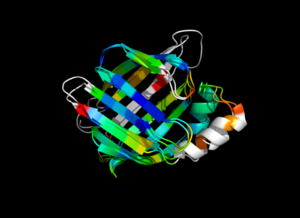 1cbs and 1hmt aligned and colored by RMSD. Dark blue is good alignment, higher deviations are in orange/yellow/red. Residues not used for alignment are colored white.
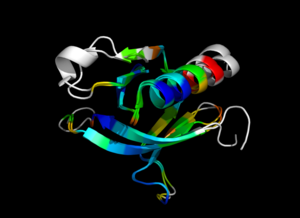 1eaz and 1fao aligned and colored by RMSD. Dark blue is good alignment, higher deviations are in orange/yellow/red. Residues not used for alignment are colored white.
