DrawBoundingBox
Overview
Draws a bounding box around a given selection.
-
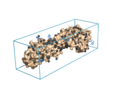 Example of a bounding box
 -
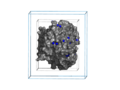 Two bounding boxes, one with 0 padding, the other with 10 Ang padding.


Example
run ~/drawBoundingBox.py
fetch 1jsd
drawBoundingBox 1jsd, r=0.33, g=0.80

# example from above w/padding, draw it light blue
drawBoundingBox padding=10, r=0.5, g=0.8, b=1.0
Installation
Copy the source code to your computer, and execute it by issuing the command "run /path/to/drawBoundingBox.py" in PyMOL.
# -*- coding: utf-8 -*-
from pymol.cgo import *
from pymol import cmd
from random import randint

#############################################################################
#
# drawBoundingBox.py -- Draws a box surrounding a selection
#
#
# AUTHOR: Jason Vertrees
# DATE  : 2/20/2009
# NOTES : See comments below.
#
#############################################################################
def drawBoundingBox(selection="(all)", padding=0.0, linewidth=2.0, r=1.0, g=1.0, b=1.0):
        """
        DESCRIPTION
                Given selection, draw the bounding box around it.

        USAGE:
                drawBoundingBox [selection, [padding, [linewidth, [r, [g, b]]]]]

        PARAMETERS:
                selection,              the selection to enboxen.  :-)
                                        defaults to (all)

                padding,                defaults to 0

                linewidth,              width of box lines
                                        defaults to 2.0

                r,                      red color component, valid range is [0.0, 1.0]
                                        defaults to 1.0

                g,                      green color component, valid range is [0.0, 1.0]
                                        defaults to 1.0

                b,                      blue color component, valid range is [0.0, 1.0]
                                        defaults to 1.0

        RETURNS
                string, the name of the CGO box

        NOTES
                * This function creates a randomly named CGO box that minimally spans the protein. The
                user can specify the width of the lines, the padding and also the color.
        """

        ([minX, minY, minZ],[maxX, maxY, maxZ]) = cmd.get_extent(selection)

        print "Box dimensions (%.2f, %.2f, %.2f)" % (maxX-minX, maxY-minY, maxZ-minZ)

        minX = minX - float(padding)
        minY = minY - float(padding)
        minZ = minZ - float(padding)
        maxX = maxX + float(padding)
        maxY = maxY + float(padding)
        maxZ = maxZ + float(padding)

        if padding != 0:
                 print "Box dimensions + padding (%.2f, %.2f, %.2f)" % (maxX-minX, maxY-minY, maxZ-minZ)

        boundingBox = [
                LINEWIDTH, float(linewidth),

                BEGIN, LINES,
                COLOR, float(r), float(g), float(b),

                VERTEX, minX, minY, minZ,       #1
                VERTEX, minX, minY, maxZ,       #2

                VERTEX, minX, maxY, minZ,       #3
                VERTEX, minX, maxY, maxZ,       #4

                VERTEX, maxX, minY, minZ,       #5
                VERTEX, maxX, minY, maxZ,       #6

                VERTEX, maxX, maxY, minZ,       #7
                VERTEX, maxX, maxY, maxZ,       #8


                VERTEX, minX, minY, minZ,       #1
                VERTEX, maxX, minY, minZ,       #5

                VERTEX, minX, maxY, minZ,       #3
                VERTEX, maxX, maxY, minZ,       #7

                VERTEX, minX, maxY, maxZ,       #4
                VERTEX, maxX, maxY, maxZ,       #8

                VERTEX, minX, minY, maxZ,       #2
                VERTEX, maxX, minY, maxZ,       #6


                VERTEX, minX, minY, minZ,       #1
                VERTEX, minX, maxY, minZ,       #3

                VERTEX, maxX, minY, minZ,       #5
                VERTEX, maxX, maxY, minZ,       #7

                VERTEX, minX, minY, maxZ,       #2
                VERTEX, minX, maxY, maxZ,       #4

                VERTEX, maxX, minY, maxZ,       #6
                VERTEX, maxX, maxY, maxZ,       #8

                END
        ]

        boxName = "box_" + str(randint(0,10000))
        while boxName in cmd.get_names():
                boxName = "box_" + str(randint(0,10000))

        cmd.load_cgo(boundingBox,boxName)
        return boxName

cmd.extend ("drawBoundingBox", drawBoundingBox)